Instagram Boosted Post Comment Automation: How to Automate Comments and DMs

Boosting a post or Reel is one of the quickest ways to put your content in front of people who don't follow you yet. You choose a budget, an audience, and a duration, and Instagram turns something you've already published into an ad that can reach a wider or more targeted group of people.
More reach usually means more comments, and many of those comments are requests: “Price?”, “Link please”, “Is this available in my size?” Answering each one by hand is slow, and people who wait too long for a reply often move on. That is why businesses use comment-to-DM automation to send the requested information as soon as someone comments.
There is a catch. An automation that works perfectly on your regular posts may stay silent on content that is being boosted, or that was boosted in the past. In most cases, this isn't a problem with your automation rules. Meta handles comments on promoted content differently, and reaching them requires a different account connection. It happens most often when fashion and beauty brands boost a creator's video that asks viewers to comment for a product link or discount code.
In this guide, you'll learn what Instagram boosted post comment automation is, why it can fail with a standard setup, why connecting Instagram to Facebook matters, and how to set up Hypello's supported workflow for boosted posts and Reels step by step.
Quick answer
Comment-to-DM automation often stops working on Instagram boosted posts because comments that arrive through an ad need a Facebook-based connection. In Hypello, link your Instagram professional account to its Facebook Page, then go to Settings → Accounts → your Instagram account → Connect Facebook and approve the permissions. Your regular comment automations can then respond on boosted posts and Reels.
What Is Instagram Boosted Post Comment Automation?
What are Instagram boosted posts and Reels?
A boosted post is an existing Instagram post or Reel that you pay to promote as an ad. You set a goal, audience, budget, and duration, either in the Instagram app or through Meta's advertising tools, and the content appears to more people as sponsored content. Unlike an ad built from scratch in Ads Manager, a boost starts from something already on your profile.
Comment-to-DM and Instagram automatic comment replies
Comment automation watches for new comments on the content you select and responds based on rules you set. It usually takes two forms:
- Comment-to-DM: when someone comments, often with a specific keyword, they receive a direct message containing the information they asked for.
- Automatic public replies: the automation replies under the comment so the commenter, and anyone else reading, knows a response has been sent.
Instagram boosted post comment automation applies these same workflows to posts and Reels that are being promoted, or that were promoted before. You may also see it called Instagram boosted post automation or Instagram DM automation for ads. If you're new to the basics, our complete guide to comment-to-DM automation covers how these workflows work on regular content.
What you can send through automated DMs
- A product link for people who comment “SHOP”
- A discount code for people who comment “CODE”
- A signup link for a webinar, waitlist, or newsletter
- A price list, menu, brochure, or answer to a common question
- A booking or inquiry link for a consultation or appointment
Because a boosted post reaches people who may not know your brand yet, a fast and relevant reply matters even more. It is often the first direct conversation someone has with your business.
Why Instagram Comment-to-DM Is Not Working on Boosted Posts and Reels
If your automation works on regular posts but doesn't respond on a boosted one, the cause is usually how your account is connected, not the automation itself.
Promoted content is treated as ad content
Meta offers two main ways for apps to connect to an Instagram professional account. With the Instagram Login setup, you sign in with your Instagram credentials. With the Facebook Login setup, you sign in with Facebook, and the app reaches your Instagram account through the Facebook Page it is linked to.
Meta's developer documentation states that the Instagram Login setup “cannot access ads or tagging.” When a post or Reel is boosted, comments left on the promoted version are associated with the ad. In the Facebook Login setup, Meta's comment notifications include the ad's ID and the original post's ID when a comment is made on an ad post, which shows that these comments are handled as ad activity.
In practice, this means an Instagram-only connection may not receive some or all of the comments that arrive through a boost, so your automation never gets the trigger it needs to respond.
Currently boosted vs previously boosted content
The issue isn't limited to campaigns that are running right now. Content that was promoted in the past can still have comments tied to its ad. For that reason, Hypello's boosted content workflow covers both posts and Reels that are currently being promoted and those that were promoted before.
Not every boosted post is affected in the same way. If your automation already responds on a promoted post, you don't need to change anything.
Configuration issue or platform limitation?
When troubleshooting, it helps to separate two kinds of problems:
- Configuration issues can usually be fixed by changing your setup. Examples include connecting through a method that can't reach ad comments, linking Instagram to the wrong Facebook Page, connecting the wrong Facebook account, or declining a permission during login.
- Platform limitations come from Meta and can't be changed by any tool. For example, Meta allows only one private reply message per comment, sent within 7 days of the comment, and the conversation can continue only if the person responds. Meta can also limit access based on account eligibility, permissions, and app review.
Reconnecting your accounts correctly solves configuration issues. It doesn't override Meta's rules.
Why You Need to Connect Instagram to Facebook for Automation
Under Meta's Facebook Login setup, every Instagram professional account must be linked to a Facebook Page. The Page acts as a bridge: the app reaches your Instagram account through the Page, and what it can do depends on what the person who logs in is allowed to do on that Page.
Hypello's boosted content workflow uses this connection, so two links need to be in place:
- Your Instagram professional account is linked to the right Facebook Page. This should be the Page that represents your business, ideally the same one you use for advertising.
- The Facebook account that manages that Page is connected inside your Instagram account's settings in Hypello. This is the Facebook profile with full control (admin-level access) of the Page. Hypello uses this connection to access the Page and its linked Instagram account, with the permissions you approve.
How the connection fits together
Instagram professional account → linked to your Facebook Page → managed by your Facebook account → connected to Hypello
If any link in this chain is missing or points to the wrong account, boosted content automation can fail even though the automation itself is set up correctly.
Hypello has two Facebook connections. Boosted posts need the one in Account Settings
Hypello's standard Instagram connection uses Meta's Instagram Login, which is why boosted content needs an extra Facebook connection. There are two different places to connect Facebook in Hypello, and they do different jobs:
- Facebook as a channel (Settings → Accounts → Add Accounts → Facebook): adds a Facebook Page as its own account so you can automate comments on Facebook posts, just like you do on Instagram. This does not enable boosted Instagram automation.
- Facebook inside your Instagram account (Settings → Accounts → your Instagram account → Facebook Account → Connect Facebook): links the Facebook Page to that specific Instagram account. This connection is required for automation on boosted Instagram posts and Reels.
How to Automate Instagram Boosted Posts and Reels with Hypello
Follow these steps to set up the workflow. The button and section names match Hypello's current interface, and may change as the product is updated. For the latest walkthrough, visit the Hypello Help Center.
Step 1: Use an Instagram professional account
Comment automation through Meta's API works with Instagram professional accounts (Business or Creator). Personal accounts aren't supported. You can switch to a professional account for free in Instagram's settings. Your account should also be in good standing and able to promote content.
Step 2: Link Instagram to the correct Facebook Page
Connect your Instagram professional account to your business's Facebook Page. You can usually do this from the linked accounts section of your Facebook Page settings, from your Instagram profile settings, or in Meta Business Suite. Meta changes these menus from time to time, so follow the current instructions in Meta's Help Center. Afterwards, confirm the link appears on both sides: the Page should show your Instagram account, and your Instagram profile should show the Page.
Step 3: Connect Facebook from your Instagram account's settings in Hypello
This is the most important step. Connect Facebook from inside the Instagram account you run boosted posts or Reels from, not as a separate channel.
- Log in to Hypello and open Settings from the main menu.
- On the Accounts tab, click the Instagram account you boost content from. This opens its Account Settings page.
- Scroll to the Facebook Account section. You'll see a card titled Connect your Facebook page.
- Click the blue Connect Facebook button.
- Meta's login window opens. Sign in with the Facebook profile that has full control of the Page linked to this Instagram account. When Meta asks which Pages and Instagram accounts to share, select that Page and its Instagram account, then approve the requested permissions.
- Meta sends you back to Hypello, which shows “Connecting your Facebook account...” followed by a confirmation message.
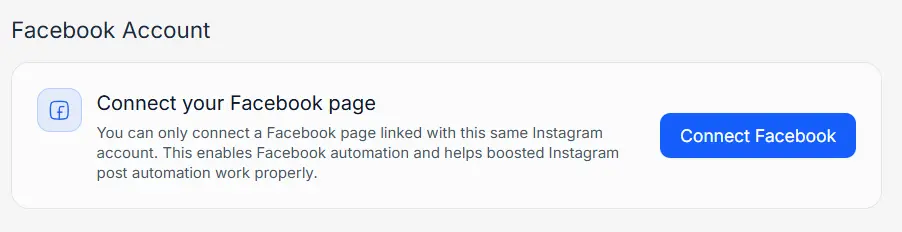
Hypello only lets you connect a Facebook Page that is linked to the same Instagram account. This connection enables Facebook automation and helps boosted Instagram post automation work properly, which is why Step 2 needs to be completed first.
Step 4: Confirm the connection is active
Go back to Settings → Accounts and open the same Instagram account. In the Facebook Account section, you should now see your connected Facebook account with the status Active, along with Reconnect and Remove buttons.
- If the status shows Not Active, click Reconnect and approve all permissions again. Hypello asks Meta for access to your Page, Page engagement, messaging, and Instagram comments. Deselecting the Page or declining a permission can stop boosted post automation from working.
- On the same page, under Global Settings, make sure Global Automations and Comment Automations are switched on. If either is off, no comment automations will run.
Step 5: Create a “DM from Comments” automation
There's no separate boosted-post switch in the automation builder. Once Facebook is connected in your Instagram account's settings, your comment automation can respond to comments on boosted content too. Open Automations, click Add Automation, and choose the DM from Comments template.
Step 6: Select the boosted post or Reel
Under Select Instagram Posts or Reel, pick the boosted post or Reel from the list. You can also choose Any post or reel if you want the same automation to run on all your content. If a promoted post doesn't appear, check your account connection first using the troubleshooting checklist below.
Step 7: Set your trigger keywords
In Set Trigger Keywords, type each keyword and press Enter, for example “LINK” or “PRICE”. Choose Any keyword if every comment should trigger the DM. You can also exclude comments that contain certain words. For a boosted Reel comment-to-DM campaign, a single clear keyword works best, because it matches the call to action in the ad: “Comment GUIDE and we'll DM you the free guide.”
Step 8: Write the DM and public replies
In Send DM, write the message people will receive. Keep it short, deliver exactly what the ad promised, and include the link or code. To reply under the comment as well, turn on Publicly Reply To Comments and add at least three reply variations, such as “Sent! Check your DMs”. Hypello picks one at random for each comment, so your replies don't all look the same.
Because Meta allows only one private reply per comment, put the most important information in that first message. If the person replies, the conversation can continue, for example with follow-up DMs.
Step 9: Go live and test on the boosted post
Click Go Live to activate the automation. Then test it: leave a comment with your trigger keyword from a different Instagram account, not the business account itself. Confirm that the DM arrives and that the public reply appears. Test before increasing your ad budget so you aren't paying for comments that don't get a response.
Missed comments before you connected Facebook? On paid plans, Hypello's Re-Trigger feature can respond to eligible comments from the past seven days, in line with Meta's 7-day limit for private replies.
Real-World Use Cases for Instagram Boosted Post Automation
Fashion and beauty brands: boosted creator videos (the most common case)
This is the situation we see most often. A fashion or beauty brand runs an ad using a creator's video. In the video, the creator tells viewers to comment a keyword, such as “LINK” for the product link or “CODE” for a discount. To get the video in front of more people, the brand boosts the post or Reel.
Then the problem appears: the comment automation that replied to everyone before the boost stops responding to many of the new comments, because those comments now arrive through the ad. Viewers who were promised a link or discount code get nothing, and the brand pays for attention it can't convert.
The fix is Hypello's boosted post automation feature. Connect Facebook from the Instagram account's settings (Settings → Accounts → your Instagram account → Connect Facebook), and Hypello can send the product link or discount code to people who comment on the boosted video. This lets the brand automate Instagram ads comments without building a separate ad funnel. The video needs to be published from the Instagram account connected to Hypello.
E-commerce: send product links
A clothing brand boosts a Reel showing a new collection and asks viewers to comment “SHOP”. Each commenter receives a DM with a direct link to the collection, so they don't have to search the profile for a link in bio. See how Hypello supports Instagram DM automation for e-commerce.
Creators: deliver resources and exclusive content
A fitness creator promotes a Reel about a beginner routine and offers a free PDF plan to anyone who comments “PLAN”. The automation sends the download link, and the creator can follow up with a related offer for people who reply and show interest.
Businesses: share discounts and promotional offers
A café boosts a post for a weekend promotion. People who comment “DEAL” receive a discount code by DM, which keeps the code out of the public comments and makes it feel like a personal offer.
Advertisers: collect leads through landing pages
A business promotes a post about an upcoming webinar. Commenters receive a DM with the registration page, which is a more direct route than asking them to find a link in the bio. You can also capture leads and emails directly in Instagram DMs.
Service businesses: direct people to bookings and inquiries
A salon or consultant boosts a before-and-after post. People who comment “BOOK” receive a booking link or a short inquiry form, and the team can step in personally when a conversation needs a human reply.
Instagram Boosted Post Comments Not Working? Troubleshooting Checklist
If Instagram boosted post comments are not working with your automation, work through these checks one at a time. They cover the most common configuration causes. Some problems depend on Meta's rules or account eligibility, so not every issue can be fixed by relinking accounts.
Instagram is linked to the wrong Facebook Page
If you manage several Pages, check which one your Instagram account is linked to in your Instagram or Facebook Page settings. Hypello can only connect the Page linked to the same Instagram account, so if the wrong Page is linked, update the link in Meta first and then reconnect Facebook in Hypello.
Facebook was added as a channel instead of in Account Settings
Adding Facebook through Add Accounts connects a Facebook Page as its own channel. It doesn't enable boosted Instagram automation. Open Settings → Accounts → your Instagram account, and use Connect Facebook in the Facebook Account section instead.
The wrong Facebook account is connected to Hypello
The Facebook account connected to Hypello must manage the linked Page. If you signed in with a different profile, such as one without access to the Page, click Remove in the Facebook Account section, then click Connect Facebook and sign in with the correct account.
Required permissions haven't been granted
If you declined a permission or deselected your Page or Instagram account during the Meta login, Hypello can't access it. Click Reconnect in the Facebook Account section and approve the requested permissions. If Hypello shows a “Your automations are not working!” alert with a Reconnect Facebook button, use it to refresh the permissions. You can also review which apps have access to your account in your Facebook settings.
The account or content isn't eligible
Confirm that the Instagram account is a professional account in good standing and that the content type is supported. Meta may restrict API access for some accounts or content, and a third-party tool can't bypass those restrictions.
The selected post or Reel can't be found
Make sure the content was published from the connected Instagram account and that the correct account is selected in Hypello. If the post is new, refresh or reconnect and check again. If it still doesn't appear, contact Hypello support with the post link.
The automation is enabled but doesn't trigger
- Confirm the automation is saved, active, and assigned to the correct post or Reel.
- In your Instagram account's Account Settings, check that Global Automations and Comment Automations are switched on.
- Check that your trigger keyword matches what people actually type, including common spelling variations.
- Test from a different Instagram account, not the business account running the automation.
- Use a new comment made after the automation was activated.
A DM or public reply isn't delivered
Meta allows one private reply per comment, sent within 7 days of the comment, so a second message to the same comment or a reply to an older comment won't go through. The commenter's message settings, a deleted or hidden comment, or Meta's rate limits can also prevent delivery. If the issue continues, contact Hypello support with the post link and the approximate time of the comment.
Why Use Hypello for Instagram Comment Automation?
Hypello brings Instagram comment-to-DM automation, automatic comment replies, story replies, and follow-up DMs into one dashboard. Boosted content is supported as a specialized workflow, so comments that come from your paid reach can be handled alongside comments on your organic posts.
Not every Instagram automation tool supports boosted content. Some only respond to comments on organic posts, and others need a separate ad-specific setup. With Hypello, once Facebook is connected in your Instagram account's settings, your regular comment automations can also cover boosted posts and Reels, including content you boosted in the past. Before you rely on any tool for a paid campaign, test it on a boosted post first.
- Faster responses: people get the information they asked for while they're still engaged with your ad.
- Less repetitive work: no more copying and pasting the same link into hundreds of DMs.
- More value from ad spend: comments from paid reach get the same timely reply as comments on organic posts.
- Consistent campaigns: every commenter receives the same accurate offer, link, or code.
Hypello works through Meta's official APIs. Learn more about Hypello's Meta verification and how to keep your Instagram automation safe. If you want to automate comments on your boosted posts and Reels, explore Hypello to see whether it fits your workflow.
Frequently Asked Questions
Can I automate comments on Instagram boosted posts?
Yes, in many cases. With Hypello, you link your Instagram professional account to its Facebook Page and connect the Facebook account that manages that Page to Hypello. Whether a specific post can be automated still depends on Meta's API rules, the permissions you grant, and the account and content involved.
Can I automate comments on previously boosted Instagram Reels?
Yes. Hypello's boosted content workflow covers Reels and posts that were promoted in the past as well as those currently running, because previously boosted content can also need the Facebook connection. The Reel must still be eligible under Meta's rules.
Why is my Instagram comment-to-DM automation not working on a boosted post?
The most common cause is the account connection. Meta states that the Instagram Login API setup cannot access ads, so comments that arrive through a boost may not reach your automation. In Hypello, go to Settings, open your Instagram account on the Accounts tab, and click Connect Facebook in the Facebook Account section. Also check permissions, keyword settings, and whether the automation is active.
Do I need to connect my Instagram account to Facebook?
For boosted post automation in Hypello, yes. Your Instagram professional account must be linked to a Facebook Page. Comment automation on regular, non-boosted posts may not require this, depending on how your account is connected.
Do I need to connect my Facebook account to Hypello?
Yes, for this workflow. In Hypello, go to Settings, open your Instagram account on the Accounts tab, and click Connect Facebook in the Facebook Account section. Sign in with the Facebook profile that has full control of the Page linked to that Instagram account, and approve the permissions Hypello requests.
Is adding Facebook as a channel the same as connecting Facebook for boosted posts?
No. Adding Facebook from Settings > Accounts > Add Accounts connects a Facebook Page as its own channel so you can automate Facebook posts. Boosted Instagram post automation needs the Facebook connection inside your Instagram account's settings, using the Connect Facebook button in the Facebook Account section.
Can Hypello send automatic DMs when someone comments on an Instagram ad?
For boosted posts and Reels connected through the Facebook workflow, Hypello can send an automated DM when someone comments. Meta allows one private reply per comment, sent within 7 days of the comment, and the conversation continues only if the person replies. If your ad was created another way, such as directly in Ads Manager, check with Hypello support whether it is supported.
Can I reply to comments on a boosted post that I missed before connecting Facebook?
Possibly. Hypello's Re-Trigger feature, available on paid plans, can respond to eligible comments from the past seven days. Meta only allows a private reply within 7 days of a comment, so older comments can't receive an automated DM.
Can I automatically reply publicly to comments on boosted Reels?
Where available, yes. You can add a public comment reply alongside the automated DM. Availability can depend on Meta's API access for that comment and on your Hypello setup, so test it on the specific Reel before relying on it.
What should I check if my boosted post does not trigger an automation?
Open Settings, then your Instagram account on the Accounts tab, and confirm the Facebook Account section shows a connected account with the status Active. Also check that Instagram is linked to the correct Facebook Page, all requested permissions were approved, Global Automations and Comment Automations are switched on, the automation is active on the correct post, and your trigger keyword matches what people type. Test with a new comment from a different Instagram account. If everything looks correct, contact Hypello support.
Conclusion: Make Every Boosted Comment Count
Boosting a post or Reel can bring in a wave of comments, but that attention only turns into results if people get a reply. When automation stops responding on promoted content, the cause is usually that Meta handles ad comments differently, and an Instagram-only connection can't reach them.
Hypello's supported workflow addresses the connection side: link your Instagram professional account to the right Facebook Page, then in Hypello go to Settings → Accounts → your Instagram account and click Connect Facebook. Approve the requested permissions, confirm the status shows Active, and test on an eligible post before you scale your budget.
If you run boosted posts or Reels and want every interested commenter to get a fast, relevant reply, set up Hypello's boosted content workflow and test it on your next campaign.
Editorial note: Meta's APIs, permissions, and eligibility rules change over time. The technical details in this article are based on Meta's developer documentation at the time of writing.
Sources
Boosted post automation
Turn comments on your boosted posts and Reels into conversations.
Connect Facebook once in your Instagram account's settings, and let Hypello reply to the people your ads bring in.
Free plan available · No credit card required